
Grandma's got a new way to text.

Exchange voice messages between SMS and old phones.

First, you make a voice recording and text it to 844-961-2835.

Then we call Grandma's phone and play your recording.

Finally, we text you what she says after the beep.

Works for Grandpa, too.

Try it

What happens next?

After you send us a text with the key word storycall, we send you a welcome message.

Reply with a voice recording of the phone number we should call with your future messages — not speech-to-text dictation, but an audio attachment. Here's how:

  1. Tap the + attachment button.
  2. Choose Audio/Voice.
  3. Record the phone number we should call with your future messages and hit Send.
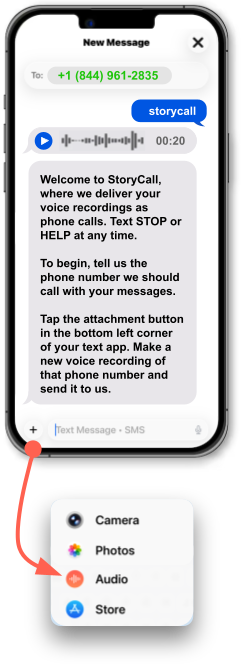
Example of an SMS phone number to StoryCall

By texting this number, you consent to receive transactional SMS messages and automated voice calls from StoryCall related to message delivery. Message frequency varies. Message & data rates may apply. Reply STOP to opt out, HELP for help.

FAQ

Does it work with her old landline?

Yes. StoryCall is designed to work well on old landlines and smart phones.

Does anyone install anything?

No. Grandma receives a normal phone call, listens, and replies after the beep.

You use SMS and attach a voice recording —  both native smartphone functionality.

What if she doesn't answer?

If Grandma doesn't answer, StoryCall will try again later.

Plus, she can say something like, “call back in an hour” or “call back tomorrow.”

What are some sample exchanges with StoryCall?

Want to see exactly what the conversation looks like? We put together sample exchanges (including delivery outcomes / call history style updates).

See: Scenarios

How do I stop?

You can opt out anytime by texting STOP.

Contact Us

Send a text-only message to the same number, 844-961-2835, for help.
Send an email for help
This opens your email app to send to Paul at paul@storycall.org.

About, Terms & Privacy

Learn more about StoryCall, and read the full policies here: